Meta's Camera Roll Fine: Check Your Photo Permissions

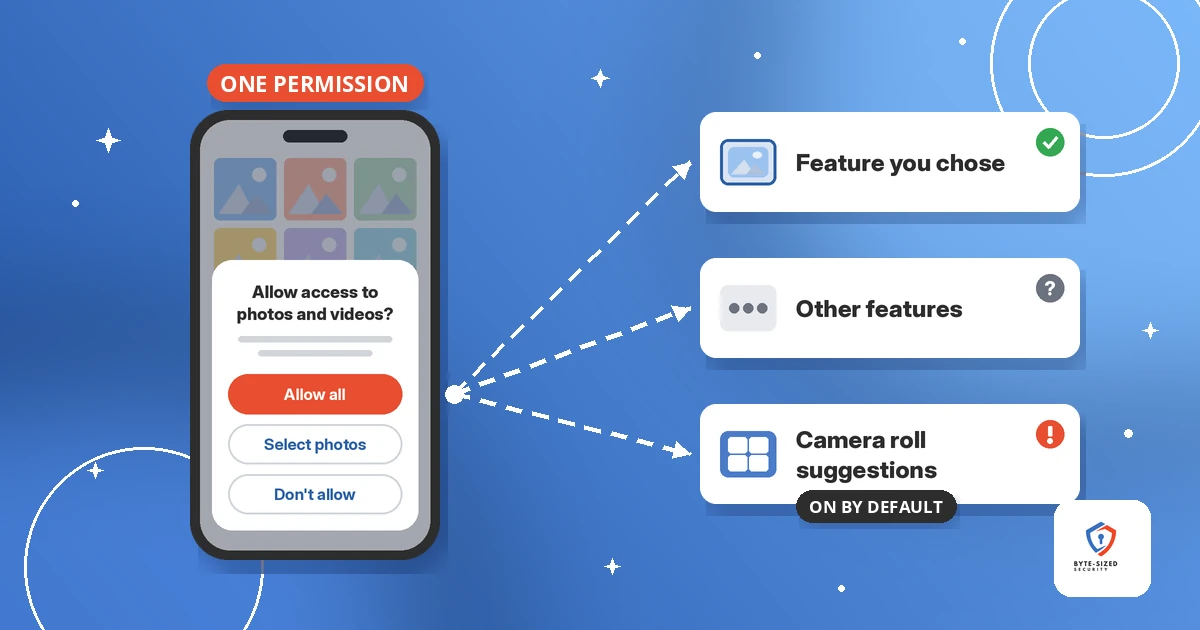
One photo permission, and a feature you never picked.
TL;DR: Italy’s data protection authority, the Garante, fined Meta Platforms Ireland €805 million over Facebook camera roll access on Android. The feature, “Get camera roll suggestions when you’re browsing Facebook,” suggests photos and videos from your phone as post ideas. The Garante found the app asked for gallery access through one permission covering several features, behind a generic notice about enabling “other features,” with the suggestions feature on by default. Meta says it will appeal. The lesson for everyone else: one broad permission covers features you never chose. Check your photo permissions on Android and iPhone, and switch apps to limited or selected photos.
This post covers what the regulator found, what it does and does not claim, what Meta has to change, and a five-minute photo permissions check for your own phone. It ends with notes for teams who build apps.
What did Italy’s Garante fine Meta for?
The Garante says Facebook for Android accessed photos, videos, and their metadata on Italian users’ phones for a camera roll suggestions feature, without specific consent and without adequately informing users.
The Garante is Italy’s data protection authority. Per its statement dated 14 November 2026, it fined Meta Platforms Ireland Limited €805 million. The decision covers the Facebook app for Android devices and one feature: “Get camera roll suggestions when you’re browsing Facebook.” The feature has been available since 2023. While you scroll, it suggests photos and videos from your phone’s camera roll as ideas for posts.
The investigation began in July 2025 after a report from the Centro Tutela Consumatori Utenti, a consumer protection center in Bolzano. The Garante ran its own technical analysis of the app.
The fine amounts to about 0.47% of the Meta group’s global turnover, per the Garante. In setting it, the regulator weighed four factors:
- About 20 million Android users in Italy affected.
- The length of the violation, which it says continues for people who have not updated the app and for people who already granted the permission.
- A previous decision against the company in 2019.
- Poor cooperation during the investigation.
It counted Meta’s changes after the consumer report as mitigating, but called them late and limited to people who update the app.
How did Facebook camera roll access work, per the Garante?
One permission covered the whole app. A generic notice about enabling “other features” came first, and the suggestions feature was on by default.
The Garante lists three findings:
- One permission for many features. The app requested camera roll access through a single permission. It applied across the entire app and covered several features with different needs.
- A vague notice. Before the permission prompt, the app showed a non-specific notice about enabling “other features.” Per the Garante, the notice did not make clear you were also authorizing suggestions from your camera roll.
- On by default. The suggestions feature was set to on.
The Garante adds one more point. When given in full, this kind of permission lets the app reach the entire photo library on the device, usually on a permanent basis. Neither the user nor the regulator has a way to verify which information the app uses.
The legal hook matters too. The Garante applied Article 122 of the Italian Data Protection Code, which transposes the EU ePrivacy Directive. It treats your smartphone as part of your private sphere. Any access to information stored on it needs free and informed consent, whether or not data leaves the phone, and whether or not anyone is harmed.
Why does one broad permission matter?
A permission belongs to the app, not to one feature. Once you allow full photo access for one reason, every feature in the app inherits it, including ones added later or switched on by default.
Phone permissions work at the app level. When you tap “Allow” so an app posts one picture, the operating system does not know which feature asked. It grants the whole app access to photos and videos, and every feature inside the app inherits it.
The Garante’s finding describes this gap. You make one decision for one reason. The app then uses the same grant for something else, and a default switch means you never chose it.
The same pattern shows up beyond photos. We covered it with browser add-ons in Browser Extensions: Are They Spying On You?, and with consent stretched past its original purpose in Pokemon Go Trained Military Drone Tech: A Consent Failure. The fix is the principle of least privilege: give each app the smallest access the job needs, and no more.
Is the Meta fine final?
No. The Garante issued a finding and a fine, and Meta says it will appeal, calling the fine disproportionate.
Meta told The Guardian it would appeal. A spokesperson said the company strongly disagrees with the regulator’s assessment “and the disproportionate level of the fine.” Early coverage carried by SecurityWeek reported no immediate comment from Meta.
Meta also challenged the Garante’s jurisdiction and argued the Irish regulator should handle the case. The Garante rejected the challenge. It says ePrivacy rules have no “one-stop shop,” the GDPR mechanism letting a company’s lead EU regulator handle cross-border cases.
Two limits on the findings are worth stating plainly. The case did not cover any use of photos to train artificial intelligence, which Meta denies. And the Garante says it will assess separately a newer feature, launched in 2026, which processes camera roll content in the cloud. Neither statement says how Meta used the photos, so this post does not either.
What does Meta have to change?
Within 60 days, Meta must ask for separate, specific consent for the feature, explain it clearly, and keep it off by default, including for people who already granted access.
Per the Garante’s order, within 60 days Meta must:
- Request consent through a separate prompt specific to the feature, and explain what the feature does, its access to the camera roll, and how to turn it off.
- Keep the feature off by default, even for people who already gave permission.
- Not enable the feature for anyone without valid consent if the deadline passes without compliance.
- Report the steps it has started within 30 days, and the measures it has adopted within 90 days.
If you live in Italy and use Facebook for Android, watch for a new consent prompt about camera roll suggestions. You choose. You do not have to wait for the prompt either. The phone settings below work today, in any country.
How do you check photo permissions on Android?
Open Settings, then Apps, pick an app, then Permissions, then Photos and videos. Choose the limited option or Don’t allow. Permission manager shows every app holding photo access in one list.
Google’s Android Help page gives two routes. Menu names vary by phone maker and Android version.
Check one app:
- Open the Settings app.
- Tap Apps, then the app. If you don’t see it, tap See all apps first.
- Tap Permissions, then Photos and videos.
- Pick the limited option, or Don’t allow if the app has no need for your photos.
Check every app at once:
- Open Settings.
- Tap Security & privacy, then Privacy, then Permission manager.
- Tap Photos and videos to see which apps hold it, and change any of them.
Android 14 added a middle choice. When an app asks for photos, the prompt offers Select photos and videos, so the app reads only the items you pick, per Android Developers. Google calls this Selected Photos Access. Apps built for Android 14 or later get it.
Two more settings help. Under an app’s “Unused app settings,” turn on Pause app activity if unused, and Android removes permissions from apps you stop opening. And for apps you rarely share photos with, choose Don’t allow. Apps built on the Android photo picker still let you share the photo you tap, with no storage permission, per Android Developers.
A note on wording: on Android, Google lists “Ask every time” for location, camera, and microphone, not for photos. For photos, the limited or selected option is the closest match.
How do you check app permissions on iPhone?
Go to Settings, then Privacy & Security, then Photos. Tap each app and switch Full Access to Limited Access, or to None if the app does not need your photos.
Per Apple’s Photos and Privacy page, you change an app’s photo access at Settings > Privacy & Security > Photos.
- Open Settings.
- Tap Privacy & Security, then Photos. The list shows each app which has asked for access.
- Tap an app with Full Access.
- Choose Limited Access and pick the photos it needs, or choose None.
Apple’s page explains the stakes. Full access grants the app your photos and videos, including hidden photos even if the album is locked. Photo access also includes metadata such as location and depth information. If a photo is already public, see our guide to removing personal information from the internet. When an app shows the system Photo Picker, you select only the photo you want to share.
For a wider view, Apple’s iPhone User Guide describes the App Privacy Report under Settings > Privacy & Security. It shows how apps use the permissions you granted.
What should teams building apps take from this?
Ask for each sensitive permission at the moment a feature needs it, explain the one feature, and leave new data-hungry features off until the user opts in.
The Garante’s orders read like a design checklist. Tie each request to one feature. Explain what the feature does, what it reads, and how to turn it off. Default to off. Ask again whenever a new feature wants to reuse an existing grant.
On Android, Google recommends its photo picker. It needs no storage permission at all. If your app keeps its own gallery picker, handle Selected Photos Access with the READ_MEDIA_VISUAL_USER_SELECTED permission, and don’t assume full library access, per Android Developers. For the same least-privilege idea applied to software agents, see Your AI Agent Shouldn’t Have Your Permissions.
The takeaway
The Garante’s case turns on one point: a permission you grant for one reason should not quietly cover another. Meta disputes the decision and plans to appeal, and the courts will settle the fine.
Your phone settings don’t need to wait. Open the photo permissions list on your Android phone or iPhone today. Any app with full access it does not need moves to limited access or none.
Which app on your phone surprised you with full photo access?
Sources
- Garante per la protezione dei dati personali, Facebook: the Garante imposes a fine of €805 million on Meta (English version on the same page), 14 November 2026.
- The Guardian, Italy fines Meta $887m for accessing Android users’ photos and videos, 15 November 2026.
- SecurityWeek (Associated Press), Meta Fined $887 Million in Italy Over Android Gallery Photos and Videos on Facebook, 14 November 2026.
- Google Android Help, Change app permissions on your Android phone.
- Android Developers, Grant partial access to photos and videos.
- Apple, Photos & Privacy.
- Apple iPhone User Guide, Control access to information in apps on iPhone.